The Know How You Need & the Tools to Get You There... Get Certified >


TriMetrix Support Central
Are you working with leaders who are new to TriMetrix?
Share this TriMetrix Assessment Overview with them.
Jump To: TriMetrix Training - Three Levels & Talent Optimizer Service
Jump To: Hiring and Interviewing with TriMetrix
Jump To: How to Create a Coaching Report
Jump To: Onboarding with TriMetrix
Jump To: Coaching and Teambuilding with TriMetrix
Jump To: How to Create a Side-By-Side Report
Jump To: How to Create Team Wheels, Talent Tracker and Tent Cards
5 Steps to Hiring, Keeping and
Developing Superior Performers
TriMetrix Training and the Talent Optimizer Service
- Timesaver, Hiring with TriMetrix Steps, Reference One-Pager
- Level 1: Complimentary Virtual Basic Training for all New Users
- Level 2: Deeper Dive Virtual Training Program
- Level 3: Assessment Certifications - Become the Expert
- Talent Optimizer TriMetrix Data Analysis Services
Hiring, Promotions, and Succession Planning with TriMetrix
- Three-Step Hiring with TriMetrix Process
- Timesaver, Hiring with TriMetrix Steps, Reference One-Pager
- HUB Producer TriMetrix Debrief Worksheet and Matching Interview Questions
- Three 'Hiring with TriMetrix' Principles
- Seven Complimentary Interview Training Resources
Are you working with leaders who are new to TriMetrix?
Share this TriMetrix Assessment Overview with them.
Convert a Candidate Report to a Coaching Report
- Sample Streamlined Coaching Report
- How to Video
- Written Step-By-Step Instructions
Onboarding with TriMetrix
- Three-Meeting Onboarding Agenda with TriMetrix Coaching Report
- Sample Employee Email Message
- For Employees: One Page Assessment Guidelines
- For Employees: Debrief Video and 100+ Self-Paced Development Resources
- For Leaders and You: Two Informational and Training Onboarding Podcast Episodes
- For You: Onboarding and Coaching Timesaver Reference Guide
Coaching and Team-building with TriMetrix
- Sample Coaching Call Agenda
- Two Debrief Memory Jogger Cards - DISC and Motivators
- Side-by-Side Report - Sample Report
- Side-by-Side Report - Meeting Agenda
- Side-by-Side Report - How to Create a Side-by-Side Report Video
- Complimentary Development Plan Worksheet - How Access and Use Video
- TriMetrix University - Video Access Video
- Team Building - Three +1 'Done for You' Workshops
- Team Wheels - How to Create Complimentary Team Summary Images
- Team Talent Tracker - Complimentary Tool Access Link and How-to Video
- Team Meeting Tent Cards - How to Create Complimentary Tent Cards
- Team Meeting Facilitation Tips: 10 + 1 Actions to Take Audio Training
Are you working with leaders who are new to TriMetrix?
Share this TriMetrix Assessment Overview with them.
1 - Training and Services
 |
 |
 |
 |
 |
Learn more about the three levels of TriMetrix Training and the Talent Optimizer service, here.
- Have leaders in your Region been asking for more training around the TriMetrix Assessment?
- Have you wondered if TriMetrix is being used in the best and more effective manner?
- Would YOU like to have more expertise and feel more confident debriefing results?
- Would your leaders benefit from an analysis of your Region's TriMetrix data to make better talent decisions?
Go to HUB TriMetrix Training Options and Services, now.
Also, reach out to suzie@pricelessprofessional.com (770-842-2669) with any questions.
Did you know? Suzie Price has been HUB's TriMetrix Solutions Consultant since 2015.
The TriMetrix Podcast Series

2 - Hiring and Interviewing
Using TriMetrix is as simple as three steps:
1. Create a Hiring Template for any position
2. Use the related competency behavior-based interview questions
3. Use the Debrief Worksheet to determine how well each candidate matches what is needed for success in the role.
STEP 1: Create a Hiring Template
Download the Hiring Template Workbook*

This workbook helps define the top priorities for the role, and then select the TriMetrix Superior Performance TriMetrix Attributes needed for success. This Hiring Template determines what interview questions to use and the specific attributes to look for in each Candidate's assessment results.
STEP 2: Use the TriMetrix Competency Behavior-Based Interview Questions
These questions will help your interview team have more productive and revealing interviews. Pick one or two questions from each set for each interview.
- General TriMetrix Interview Questions
- Under the Hood Graph (Personal Skills) Interview Questions
- Motivators Hiring Interview Questions
- See Producer Interview Questions, below.
STEP 3: Compare the Candidate's Results to the Hiring Template Using the Debrief Worksheet
- Download the (UPDATED 8/2025) Debrief Worksheet
- Review and Discussing the Results with Internal Decision-makers Following the Recommended Process: How to Facilitate a Great Discussion About Each Candidate's Results
- HUB PRODUCER TriMetrix Hiring Attributes Debrief Worksheet and Matching Interview Questions (2025) Hiring the right Producers can make all the difference, and the HUB Producer Hiring Attributes Debrief Worksheet is here to help. It outlines the traits that match your top performers—and when you pair it with the Matching Interview Questions, you'll have a potent edge in finding the right fit faster. If you're hiring or planning to, let me know—I'll be happy to walk you through how to put these tools to work.
Hiring with TriMetrix - Timesaver Document

Top 3 Principles for Hiring with TriMetrix
1. Consider all five areas of Job Fit with the TriMetrix Car analogy
2. Assessment results should account for less that 30% if an management decision.
3. Make sure each report is reliable by reviewing the Dimensional Balance Graph Reliability score.
Principle #1: Five Areas of Job Fit with the TriMetrix Car Analogy
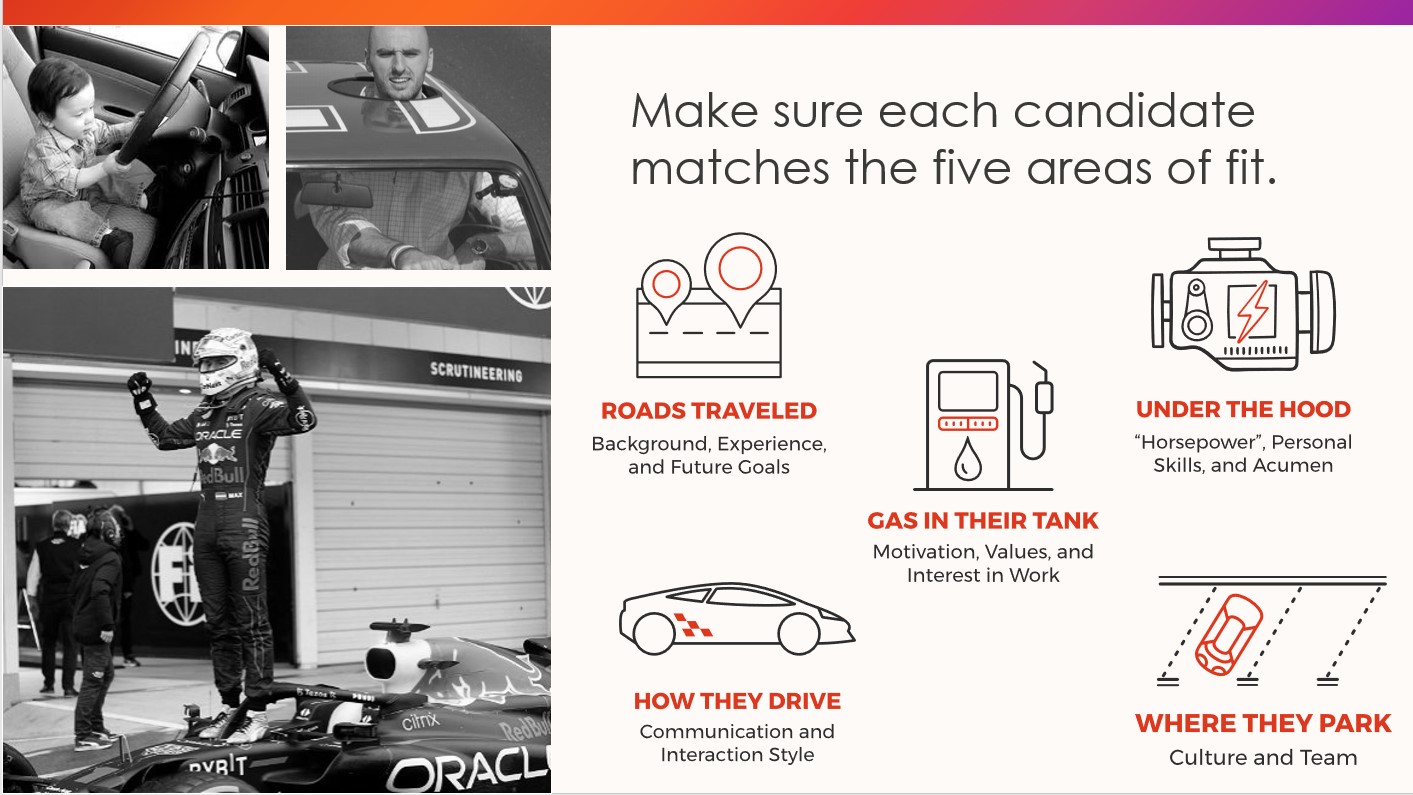
Roads Traveled: Background and Experience & Future Goals.
Where They Are Parked: Culture, Team, and Leader Match.
Under the Hood: 23 Personal Skills revealed in TriMetrix
Gas in Their Tank: Personal Interests, Attitudes and Values (PIAV) / Workplace Motivators revealed in TriMetrix
How They Drive: DISC Behavioral Styles revealed in TriMetrix
- Dive Deeper Video: Two Real World Applications: Hiring and Coaching
- Dive Deeper Podcast: (Audio +Transcript):
Five Reasons Why Employees Fail - Job Fit Car Analogy
Principle #2: Assessment Results account for less than 30% of any management decision.**
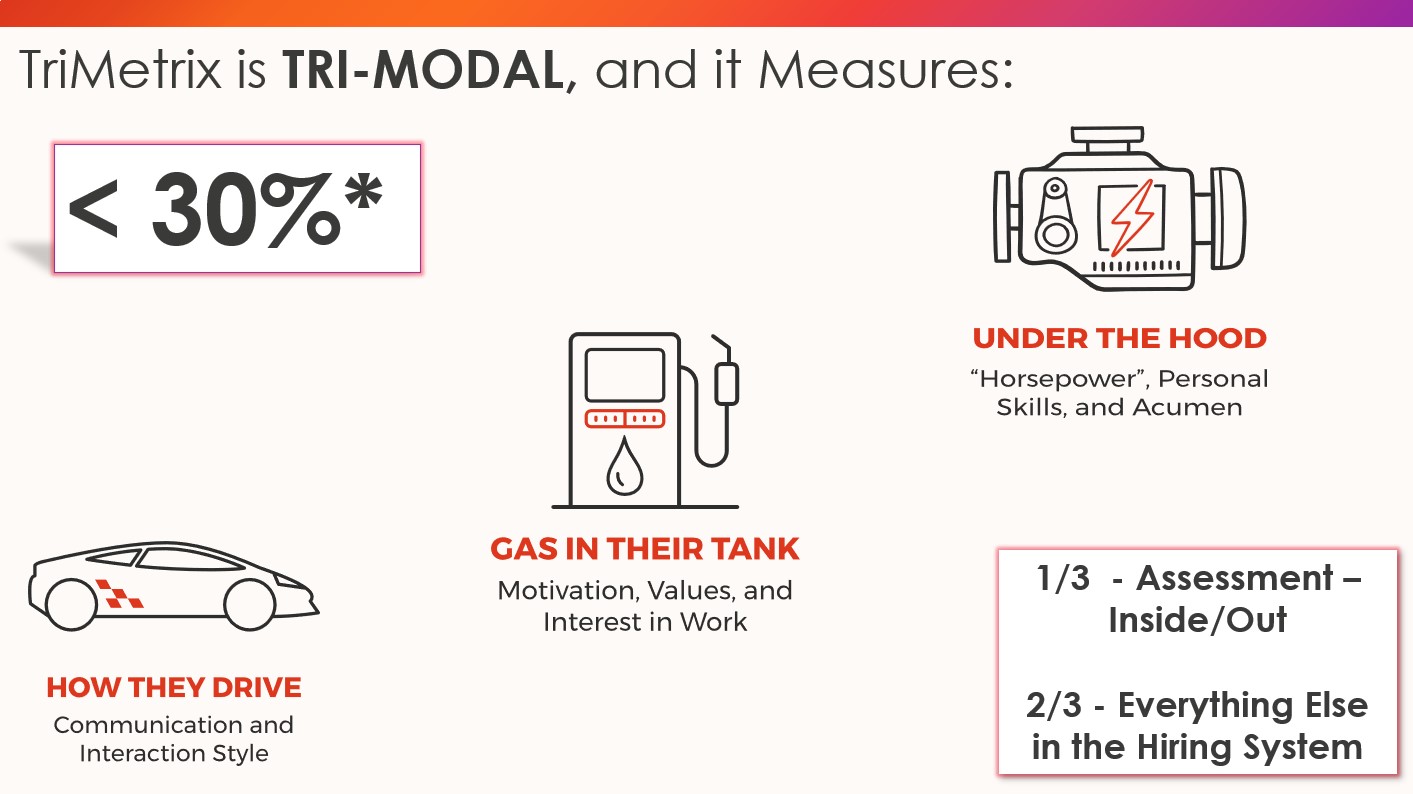
Principle #3: Make sure each report is reliable.**
To verify the reliability of the report, check the Dimensional Balance Page Graph Reliability Score. If the score is Low Reliability**<.70 - <.70 AND they are a solid candidate in all other areas, consider having them retake that part of the assessment to ensure accurate results. Use this document.
- Process: Use this Sample Email and Links **
Are You Receiving Too Many Unreliable Reports?
Consider updating your instructions when you send the assessment link to candidates:
- Process: Sample Email Template
- Dive Deeper: HUB TriMetrix Basics Video Training
- Questions? Contact Suzie - suzie@pricelessprofessional.com
Complimentary Interview Resources
- Infographic: Comparison Graph Image
- Booklet: The Top Thirteen Hiring Mistakes
- Quiz: Which of the Top Thirteen Hiring Mistakes are you doing?
- eBook: Risk, Reward and Research in Hiring
- Podcast: Risk, Reward and Research in Hiring
- Book: How to Hire Superior Performers: 70 Best Practices and Strategies for Hiring Managers
- Podcast Episodes: Hiring Episodes on the Wake Up Eager Workforce Podcast
Are you working with leaders who are new to TriMetrix?
Share this TriMetrix Assessment Overview with them.
3 - How to Create a Coaching Report

Converting a Candidate Report to a Coaching Report can increase engagement, productivity and commitment for New hires and also support Team Building, Conflict Resolution, and Personal and Professional Development. And it only takes 30 seconds to convert a report online, once you know how.
Candidate (Talent) Reports are shorter, usually 14 pages.
Streamlined Coaching reports are longer, usually 47 pages.
Full Coaching Reports are the longest, usually 80 page.
- Video & Step-By-Step: Converting Your Candidate Report (Also Below)
- Dive Deeper: Self Paced Coaching Report Debrief Video and Tools
- Questions? Contact Suzie - suzie@pricelessprofessional.com
Step-by-step Instructions
Time to Complete: 30 seconds
- Login to www.ttiadmin.com
- If you don't have login information, contact your region's HR Leader or Suzie.
- Click the Report Management tab, at the top of the page
- In the dropdown menu, select: Convert One Report to Another
- Select the Report – TriMetrix ACI – Management Staff* (or Sales, or Executive), click Continue
* When in doubt, use the Management Staff version. - Go to the search bar, near the top right corner, to enter in the name(s), then click Continue
- Approve the conversion charge ($20/report, added to monthly region invoice). The report will be created and found in your Region's link.
Creating a Streamlined Coaching Report**
- Select Report. Click on the Person’s name.
- On top right side, click on dropdown box.
- Select Streamlined Version.
- Save to your computer.
- Send the Results using this Sample Email Message.
**The streamlined versions makes the Coaching report more digestible at 45 pages
(compared to the full report at 70+ pages). It works well with debrief video:
www.pricelessprofessional.com/myassessment
4 - Onboarding Resources
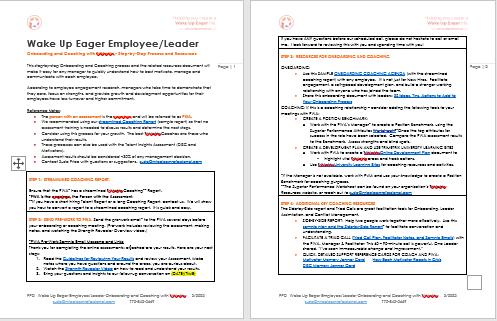
Use our step-by-step, proven Onboarding Agenda Meeting process, with the streamlined TriMetrix Coaching Report, to connect with and keep every New Hire involved, enthused, and productive in their first ninety days -- the crucial period when all new hires decide if they will stay or go!
New Hire Onboarding Program with TriMetrix
1. Download the Word Version
2. Download the Visual Workbook Version
3. Send the New Hire Email (below)
This program:
- Reveals new hire insights
- Facilitates conversations around working styles
- Generates commitment to the company
- Is user-friendly and straightforward
New Hire, Coaching and Team Building Email When Sending an Assessment - EDIT for Each Situation
Use this email to send each employee their Coaching Report, and these two pre-meeting tools. This will increase their interest and understanding of the assessment, and decrease any resistance and concern.
Welcome to HUB International, EMPLOYEE NAME. As a part of our onboarding process, I have attached a copy of your Assessment results, and I've shared tools below to help you understand and use your results.
I will be scheduling three onboarding meetings with you where we can use the Assessment to review your strengths, and I can learn how to best support you in our work together.
ONBOARDING MEETING PREWORK:
- Read these Guidelines for Reviewing Your Results.
- Watch the Debrief Video: Understanding Your Assessment.
I look forward to meeting with you to discuss this when we meet on _______. Let me know if you have any questions.
Dive Deeper:
Episode #44 Getting New Hires to Stay: Reduce Turnover & Increase Motivation in the Workplace
Episode #45 More Getting New Hires to Stay with HR Executive Judy Simmons, PHR
Resource: Onboarding and Coaching Process Timesaver Document
5 - Coaching and Teambuilding
Are you working with leaders who are new to TriMetrix?
Share this TriMetrix Assessment Overview with them.
For New Coaching Programs
- Send each employee their Coaching Report and the links to Coaching Call Pre-Work using this Message Template
- Include the Motivators and DISC Memory Jogger Cards for refence during coaching
- Motivators Sales Cheat Code Card
- Process: Use this agenda for the First Coaching Call Meeting
For Side-by-Side Report Coaching Programs
A Side-By-Side Report compares assessment results of two people, and can be used in Mentoring, New Leader Assimilation, Conflict Resolution, and Team Building.
- Create a side-by-side report for two people (video below)
- Process: Use this Side-By-Side Meeting Agenda
- Resource: Sample Side-By-Side Report
For Development Plan Coaching Worksheet
Create a development plan worksheet here. (Video below.)
- Select: TriMetrix ACI
- Enter: Name, Company and Position
- Select: Personal Skills, Motivators (PIAV) and Behavior Traits (DISC) you want to learn more about.
- Print: Use this worksheet to track action plans and results.
For Self-Directed Coaching with TriMetrix University
Provide employees access to TriMetrix University which provides 100+ Coaching and Learning Activities in 'Learning Bites'. Each TriMetrix Attribute 'Learning Bite' Workbook includes:
- Why That TriMetrix Attribute is Important
- What Skills are Associated with Each Area
- Specific Tips for Development
- Coaching Activities
'Done for You' Team Building Workshops
Two TriMetrix 'Growing Self and Other Awareness' General Workshops
1) Two to four hour workshop with the Streamlined TriMetrix Coaching Report (47 pages)
2) One hour workshop with the Short TriMetrix Candidate Talent Report (14 pages)
Includes: PowerPoint Slides - For the Two to Four Hour Workshop with the Streamlined Coaching Report; PowerPoint Slides - For the One Hour Workshop w/ Short Candidate Report. Three class handouts: 2 Memory Jogger Cards: Motivator and DISC and the Creating Effective Emails exercise/document. Plus: Optional add-on DISC exercises.

NEW - April 2025 - Motivating Yourself and Your Workforce, What You Wish You Knew
Unlock the key to motivation—yours and your team’s. This high-impact, ready-to-use workshop is designed for fast-paced leaders, trainers, and HR professionals who want practical, actionable insights to drive engagement and performance.
In just two hours, participants will:
✅
Discover what truly drives them
with a personal Workplace Motivators Assessment (created from their current TriMetrix
assessment)
✅
Gain instant clarity
on team dynamics with a customized Team Report
✅
Learn to adapt leadership, sales, and
coaching strategies based on motivational insights
✅
Walk away with actionable
tools, including interview questions, management tips, and
relationship-building strategies
This isn’t just theory — it’s a plug-and-play system with everything you need: customizable PowerPoint, participant handouts, discussion guides, and exclusive online resources.
Give your team the motivation breakthrough they’ve been missing. Let’s make motivation work for you!
Download the resources: Step-by-Step Program Agenda/Outline, Fillable Participant Workshop Handout, and Done-For-You PPT Slides. Contact Suzie with questions.
Building Trust for New and Established Teams
Two to four hours, depending on number of participants.
Use the Streamlined TriMetrix Coaching Report (47 pages)
Includes: A detailed agenda and facilitation instructions for each exercise. Additional Notes: This program is focused on using the assessment as well as other non-assessment-related exercises, and could be a good next step AFTER the General 'Growing Self and Other Awareness" Workshops, above. It may be led by the leader of the team or an internal or external facilitator.
One Hour Team Workshop (older, but still solid material)- Sample PPT with Facilitator Notes (Contact Suzie Price for other resources or facilitation assistance.)
Questions? Contact Suzie - suzie@pricelessprofessional.com
Additional Team Building Support Resources:
- 100+ Self-Paced Debrief Video and Resources: www.pricelessprofessional.com/myassessment
- Podcast Episode - Facilitation Tips: Talent Insights Team Building Session Success!: Ten (+1) Practical Facilitation and Debriefing Tips
- Want more TriMetrix expertise? Level 3 TriMetrix Training: Certifications.
Team Wheels
The Team Wheels provide a single summary image of the entire team at a glance.
Team Talent Tracker
This talent tacker includes memory jogger details for DISC and Motivators and a summary of each member's style. Is also shares tips for collaboration, and reminder of top strengths and potential 'over do's'. Share with the Team Leader or with the entire Team.
- Create your Team Talent Tracker
Meeting Tent Cards
Use tent Cards during the team building exercise as a memory jogger of each person's individual strengths and preferences.
Don’t miss our newsletters, blogs or podcasts...